

Most buyers think a complete all-in-one desktop requires choosing between bloated prices and weak performance. I have analyzed these options and weighed real buyer feedback to rank the top choices for you. In my view, getting this right means looking past flashy marketing. Let us see how the ranked comparison actually shakes out.
1. Dell Inspiron 5400 AIO 23.8 Inch FHD Touchscreen All in One, Intel Core i3-1115G4, 8GB 2666MHz DDR4 RAM, 1TB SATA HDD, Intel UHD Graphics, Windows 10 Home
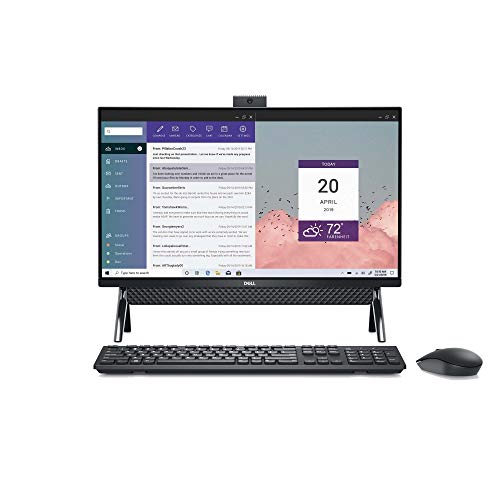
Its single biggest strength is the complete desktop setup it provides right out of the box, saving you from matching separate monitors and towers. I would rank this first because the 23.8-inch touchscreen gives you a remarkably clean workspace without cable clutter.
You do need to know about its primary bottleneck, which is the sluggish 1TB SATA HDD holding back the snappy processor. In my opinion, you should budget for an immediate storage upgrade to make this machine run the way it ought to.
Buyers frequently mention that the all-in-one format drastically reduces desk clutter.
Reviewers often note that the included mechanical hard drive feels noticeably slow for modern tasks.
Users appreciate the convenience of having a mouse, keyboard, and display included together.
Get It From Amazon Now: Check Price on Amazon & FREE Returns
2. A-Tech 16GB Kit (2x8GB) RAM for Dell Inspiron 24 5400 AIO, 24 5401 AIO, 24 5411 AIO, 24 5415 AIO, 24 5421 AIO, 27 7700 AIO All-in-One Desktop | DDR4 3200MHz PC4-25600 SODIMM 1.2V 260-Pin Memory

This memory kit is best for multitasking power users who find their current system stalling under heavy browser loads. I consider this a smart pick for anyone wanting to speed up their daily workflow without buying a brand-new computer.
The main catch is matching frequencies carefully, since mixing wrong speeds causes system instability. In my view, checking your exact motherboard specs before ordering saves you major headaches.
Customers consistently report smoother multitasking performance after installing the kit.
Buyers note that the memory modules install easily into compatible desktop slots.
Reviewers appreciate the noticeable boost in overall system responsiveness.
Get It From Amazon Now: Check Price on Amazon & FREE Returns
3. 130W Charger for Dell Inspiron 7700 5400 5490 AIO W23C002 W24C W24C001 | Compatible with W24C002 All-In-One PC Power Supply Adapter Cord

An interesting feature of this replacement brick is its precise voltage matching, which protects your sensitive internal components from sudden power surges. I think having a reliable power source matters immensely for an all-in-one machine that stays plugged in all day.
You must verify your exact connector shape before purchasing, because Dell uses several similar plug designs. In my judgment, buying a proper replacement prevents the electrical faults common with cheap third-party chargers.
Users note that the charging cord matches the original factory specifications closely.
Buyers highlight that it resolves unexpected power drops and failure-to-boot issues.
Reviewers mention the build quality feels sturdy and reliable for daily use.
Get It From Amazon Now: Check Price on Amazon & FREE Returns
4. A-Tech 16GB RAM for Dell Inspiron 5400 AIO (All-in-One) – DDR4 2666MHz PC4-21300 Non-ECC Unbuffered SODIMM 260-Pin All-in-One Memory Upgrade Module
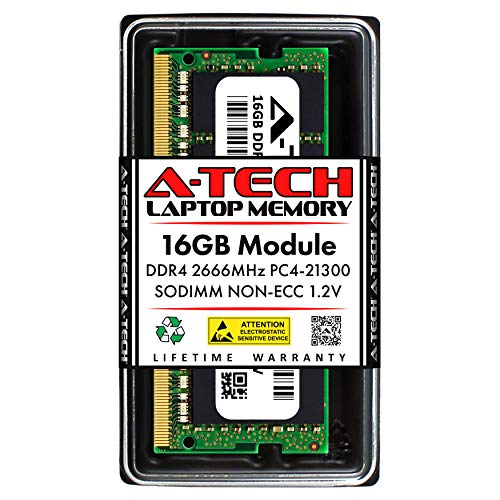
Its most common buyer complaint centers on the limited 2666MHz speed, which trails behind newer memory standards. However, the balanced picture shows it provides an affordable route to more RAM without overspending on specs your machine cannot utilize anyway.
I would suggest this specific module only if your processor natively caps out at that frequency. In my opinion, matching your hardware limits prevents you from wasting money on unexploited performance.
Customers frequently state that the installation process takes only a few minutes.
Buyers observe a reliable reduction in system lag during routine tasks.
Reviewers point out that the price point offers great value for a memory bump.
Get It From Amazon Now: Check Price on Amazon & FREE Returns
5. LANDALANYA CPU Cooling Fan for Dell Inspiron 24-3475 3477 3480 3277 AIO 5400 5490 5491 5401 22-3280 3275 W19B 27 7700 7790 7791 PVB070B05H-P01-AE BSC0705HA-00 01TMP6 0C04TH DC5V Fan

Unlike the memory upgrades mentioned above, this cooling fan addresses a hardware failure rather than a performance bottleneck. I view this component as an essential repair item when your current fan starts making grinding noises or fails completely.
The main limitation is that replacing an internal fan requires careful disassembly of the entire display chassis. In my judgment, you should only attempt this fix if you feel comfortable handling delicate internal cables.
Buyers note that the replacement fan restores quiet operation to noisy systems.
Reviewers mention that the mounting holes align correctly with the factory bracket.
Users report successful temperature drops after swapping out the worn-out cooler.
Get It From Amazon Now: Check Price on Amazon & FREE Returns
Choosing Between Them
When building out your workspace, I recommend the Dell Inspiron 5400 AIO as your top pick for its space-saving design, provided you budget for a quick storage swap. If you already own one and need extra speed, the A-Tech 16GB RAM serves heavy multitaskers well, while the cooling fan and power adapter handle essential repairs.
You should keep in mind that buying an all-in-one machine means accepting limited upgrade paths compared to traditional desktop towers. Planning for those hardware limits now will save you frustration down the line.
As an Amazon Associate, this site earns from qualifying purchases. Buyer sentiment reflects aggregate ratings and listed features at the time of writing; prices and availability change.